n8n vs Make vs Zapier: Which One to Choose (2026)
Choose n8n if you need self-hosting, long-running AI agents, or workflows with many steps. Choose Make if you want a visual builder with branching at a low entry price. Choose Zapier if your team is non-technical and wants the widest app coverage. However, features are rarely the deciding factor. The billing unit is. We ran the math on one six-step workflow run 2,000 times a month. It bills as 2,000 units in one tool and about 12,000 in another.
Key Takeaways
- n8n counts one execution per workflow run, however many steps it has. That makes it the cheapest for step-heavy and AI agent workflows, and it is the only one you can self-host.
- Make charges one credit per module run and has the lowest entry price, so it suits visual, branching scenarios at low to moderate volume.
- Zapier has the most apps (9,000+) and the fastest start, but every successful action step is a billed task.
- Before you pay, count the billable units of one real workflow. The same workflow can differ by 5x or more between tools.
- Check what happens at the plan limit. Zapier keeps running at a premium, Make stops, and n8n's cloud tiers are capped.
Which tool should you pick?
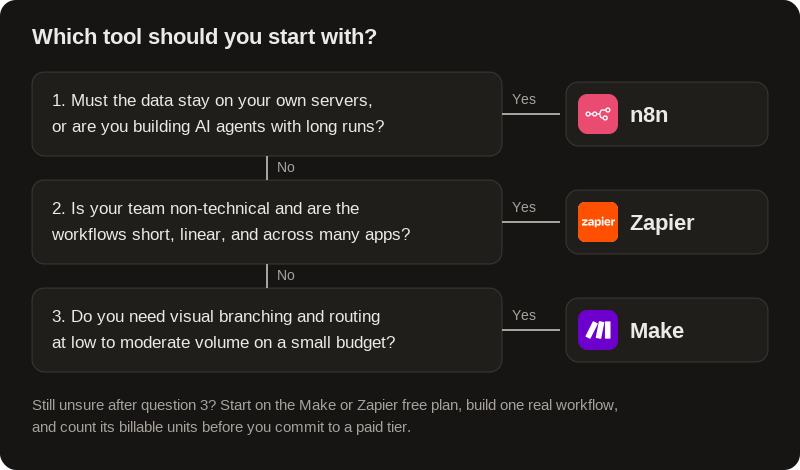
Pick n8n for self-hosting, AI agents, and step-heavy workflows. Pick Make for visual branching on a small budget. Pick Zapier for the fastest start and the most app connections. If you are unsure, build one real workflow on a free plan and count its billable units before you pay for anything.
In our client builds, the tool matters less than matching it to the workflow, the team, and the volume. For this guide, we analyzed each vendor's pricing and help pages and ran the numbers ourselves. Below, you will see where each tool wins and where it costs you.

n8n
Self-hostable. Counts whole-workflow runs. Strongest for AI agents.

Make
Visual scenarios with routers. Lowest entry price. Credit based.

Zapier
Widest app list. Easiest first workflow. Task based.
How do n8n, Make and Zapier compare at a glance?
No tool wins every row. n8n leads on cost per step, hosting control, and AI work. Make leads on visual building per dollar. Zapier leads on app coverage and ease of start. The table below uses each vendor's own pricing and help pages, retrieved on 2026-11-09.
| n8n |
Make |
Zapier |
|
|---|---|---|---|
| Best for | AI agents, self-hosting, long workflows | Visual branching on a budget | Non-technical teams, widest app list |
| Billing unit | Whole-workflow execution | Credit per module run | Task per successful action |
| Paid entry plan | €20/mo billed annually, 2.5K executions | About $9/mo billed annually, 10,000 credits* | $19.99/mo billed annually, 750 tasks |
| Free option | Self-hosted Community Edition | Free plan, 1,000 credits | Free plan, 100 tasks, two-step Zaps |
| Self-hosting | Yes | Not on its pricing page | Not on its pricing page |
| App coverage | Every integration on all plans | 3,000+ apps advertised | 9,000+ apps advertised |
| At the plan limit | Starter and Pro capped | Scenarios stop at zero credits | Pauses at 3x plan size with pay-per-task |
| Our verdict | Wins on cost per step and control | Wins on visual builder per dollar | Wins on coverage and ease |
*Make's own pricing page did not display plan prices when we checked, so the Make entry price comes from a 2026 pricing guide by Jetadmin. Confirm it on Make's page before you buy. n8n lists prices in euros.
Which tool is cheapest for your workflow?
n8n is cheapest for workflows with many steps, and Make has the lowest entry price. The reason is the billing unit. An execution is one run of a whole workflow, a task is one successful action step, and a credit is one module run. n8n counts "a single run of your entire workflow" as one execution, "no matter how many steps" it has (n8n pricing FAQ). Zapier bills every successful action as a task, and triggers, filters, and paths are free (Zapier help).
Make charges one credit per module run, while routers and error handlers cost nothing (Make help). As a result, the number of steps, not the number of runs, drives the bill in Make and Zapier.
For example, take one workflow: a trigger and five actions, run 2,000 times a month. Here is what each tool counts.
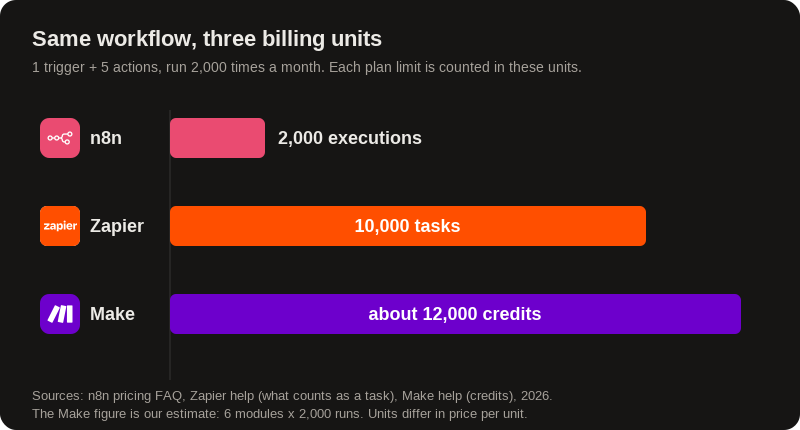
n8n bills 2,000 executions, which fits inside the €20 Starter plan and its 2.5K executions. Zapier bills 10,000 tasks (5 actions times 2,000 runs). That is far above the 750 tasks in the $19.99 Pro entry plan, so you would climb several tiers on Zapier's published ladder. Make bills about 12,000 credits, a little over the 10,000 that its paid plans commonly include, so you would add a credit bundle.
However, the hidden cost with n8n is the server. In our experience, self-hosting is free in license terms but you still pay for hosting, backups, and updates. The Community Edition also leaves out SSO and Git-based version control (n8n docs).
Verdict: n8n wins for step-heavy workflows, Make wins on entry price, and Zapier costs the most per step but gets you running fastest.
Which tool gives you the most control over your data?
n8n wins on control. It is the only one of the three you can run on your own server. Its Community Edition is free to self-host, and its Business plan is self-hosted only (n8n pricing). The project is also widely used: its GitHub repository had 209,917 stars on 2026-11-09 (GitHub). The Make and Zapier pricing pages list hosted plans only.
Self-hosting has one catch that agencies often miss. n8n's source is under the Sustainable Use License, which allows use "for your own internal business purposes or for non-commercial or personal use" (n8n license). It lets you share the software only free of charge and for non-commercial purposes.
In practice, running n8n for your own company is covered. However, hosting it for paying clients as a service is a different case. Read the license and ask n8n before you do that.
Verdict: n8n wins for data control and on-premise needs. Make and Zapier win if you never want to maintain a server.
Which tool is best for AI agents?
n8n is our pick for AI agents. The reasons are how it bills and how long a run can last. Because one execution covers the whole workflow, an agent that loops through several tool calls inside one run still counts once (n8n pricing FAQ). On Zapier or Make, each of those steps would add to the bill.
Run length matters too. In fact, n8n lists a maximum execution duration of 5 minutes on Starter and 40 minutes on Pro and Enterprise. An agent that waits on several model calls can pass five minutes, so plan for Pro if your agents run long.
Zapier takes a different route. Its MCP feature costs 2 tasks per successful tool call, and its separate Agents product uses its own activity quota instead of tasks (Zapier pricing). Make charges one credit per AI app operation, plus token usage on its automatic AI provider connections (Make help).
For a single AI step, such as summarizing a form and posting it to Slack, all three are fine. However, the gap opens when the agent branches, retries, and calls tools in a loop. For cost context on agent projects, see our guide to what it costs to build an AI agent.
Verdict: n8n wins for multi-step agents. Zapier and Make are fine for one-step AI actions.
Which tool connects to the most apps?
Zapier wins on coverage, advertising 9,000+ apps against Make's 3,000+. n8n's pricing page gives no app count, but it includes every integration on every plan (Zapier pricing, Make pricing). Treat all of these as marketing figures. Make's own site also says "more than 1,000 3rd party apps" in its FAQ, so the counts are not measured the same way.
In addition, Zapier is the quickest to start. Its Free plan allows two-step Zaps only, and Pro unlocks multi-step Zaps and premium apps. Polling speed rises with the plan: 15 minutes on Free, 2 minutes on Pro, and 1 minute on Team.
In our client builds, the app count only matters for the apps you use. Therefore, before you pick, list the five tools your workflow touches and check that each one has an action for the exact step you need. A missing action costs more than any price gap.
Verdict: Zapier wins on breadth and speed to a first workflow. Make is close. n8n relies on its HTTP and code steps for gaps.
What happens when you hit your plan limit?
Zapier keeps you running at a premium, Make stops, and n8n's cloud tiers are capped. This is the least-discussed difference. It decides whether a busy month ends in a surprise bill or a broken workflow.
With pay-per-task on, Zapier bills overage at 1.25x the base rate on annual plans and 2.5x on monthly plans. Usage then pauses at 3x your task limit until the next cycle. With pay-per-task off, new runs are held until your billing cycle resets (Zapier pricing). Zapier also emails you at 80 and 100 percent of your limit.
By contrast, in Make, "your scenarios won't continue to run" when credits hit zero. Incoming webhooks queue up to a storage limit. You can buy extra credits in bundles of 1,000 or 10,000, or turn on auto-purchase (Make help).
Meanwhile, n8n's pricing table lists the Starter and Pro execution limit as "Capped" without more detail. On self-hosted Business and Enterprise, workflows continue and overage charges may apply (n8n pricing).
Verdict: Zapier is the most forgiving, Make is the most predictable. For customer-facing flows, set usage alerts on all three.
Who should choose what?
If your team is non-technical, choose Zapier. If an ops person builds branching scenarios on a budget, choose Make. If you need control, AI agents, or step-heavy workflows, choose n8n. Here are the same rules by reader profile.
- Solo operators and non-technical teams with simple, linear workflows: Choose Zapier. You will ship the first automation fastest, and the 9,000+ apps cover most stacks.
- Ops people and small agencies who want visual branching and a low bill: Choose Make. Routers cost no credits, and the entry price is the lowest of the three.
- Technical teams, AI agent builders, and anyone with data-residency needs: Choose n8n. One execution per run keeps long workflows cheap, and you can self-host.
One edge case: if you plan to host automations for paying clients, read the n8n license before you choose it. For a deeper look at when agents pay off at all, read why agentic AI projects fail.
What about other automation tools?
Other tools exist, but these three cover most small-team needs. Options such as Pipedream, Activepieces, and Microsoft Power Automate suit specific cases. A plain script on a schedule is also valid when one workflow rarely changes. We did not benchmark them for this guide, so we make no price or feature claims about them.
If you are choosing between building and buying, our guide on AI agents versus agentic AI explains when a simple automation is enough.
Frequently asked questions
Is n8n better than Make?
It depends on your workflow. n8n is better for self-hosting, long AI workflows, and step-heavy automations because it counts one execution per run. Make is better for a visual builder, a small budget, and a quick start. Neither wins everywhere, so decide on billing unit and hosting needs.
Is n8n really free?
The self-hosted Community Edition is free and includes almost the full feature set. Paid features include SSO and Git version control, and you still pay for your own server. The license also limits use to internal business purposes, so check it before hosting n8n for clients.
Which is cheapest for 10,000 runs a month?
It depends on steps per run. n8n counts 10,000 executions, which fits its Pro plan. For a six-step workflow, Make would count about 60,000 credits and Zapier about 50,000 tasks, so the gap widens with every step you add. Always count units before you compare prices.
Can I switch tools later?
In our experience, you rebuild rather than import. Each tool has its own workflow format and connection setup. Keep a written spec of each workflow, with triggers, steps, and error handling, so a move is a rebuild and not a research project.
Which tool is best for AI agents?
n8n is the default for multi-step agents, because one execution covers the whole run and Pro allows runs up to 40 minutes. Zapier suits a single AI step inside a simple workflow. Make works if your agent steps are few and your credit budget is clear.
Sources
All pages retrieved 2026-11-09. Prices change, so confirm on each vendor page before you buy.
- n8n, Pricing: https://n8n.io/pricing/
- n8n Docs, Community edition features: https://docs.n8n.io/hosting/community-edition-features/
- n8n, LICENSE.md (GitHub): https://github.com/n8n-io/n8n/blob/master/LICENSE.md
- GitHub REST API, n8n-io/n8n repository data: https://api.github.com/repos/n8n-io/n8n
- Make, Pricing: https://www.make.com/en/pricing
- Make Help Center, Credits: https://help.make.com/credits
- Jetadmin, Make.com Pricing in 2026: https://www.jetadmin.io/blog/make-pricing/
- Zapier, Pricing: https://zapier.com/pricing
- Zapier Help, What counts as a task: https://help.zapier.com/hc/en-us/articles/8496196837261
- Simple Icons, brand marks for n8n, Make and Zapier (CC0 icon data): https://simpleicons.org/
About the author: Media Targeters builds custom AI agents and automations in n8n, Make, Zapier, and code for e-commerce, SaaS, and agency teams, with fixed pricing and a typical 2 to 4 week delivery. Questions on a build? Contact us at contact@mediatargeters.com.